🚀 How to Create Your First Microsoft Copilot Agent

Download the Practical Guide for Leaders to Scale AI Across Their Organization
One of the biggest misconceptions about Microsoft Copilot is that it is simply a chatbot.
While Copilot Chat is incredibly powerful, the next evolution of AI productivity comes from something even more valuable:
AI agents
The good news is that you don’t need to be a developer to build one.
Microsoft’s Agent Builder allows anyone to create a Copilot agent directly inside Microsoft 365 Copilot with little or no technical experience.
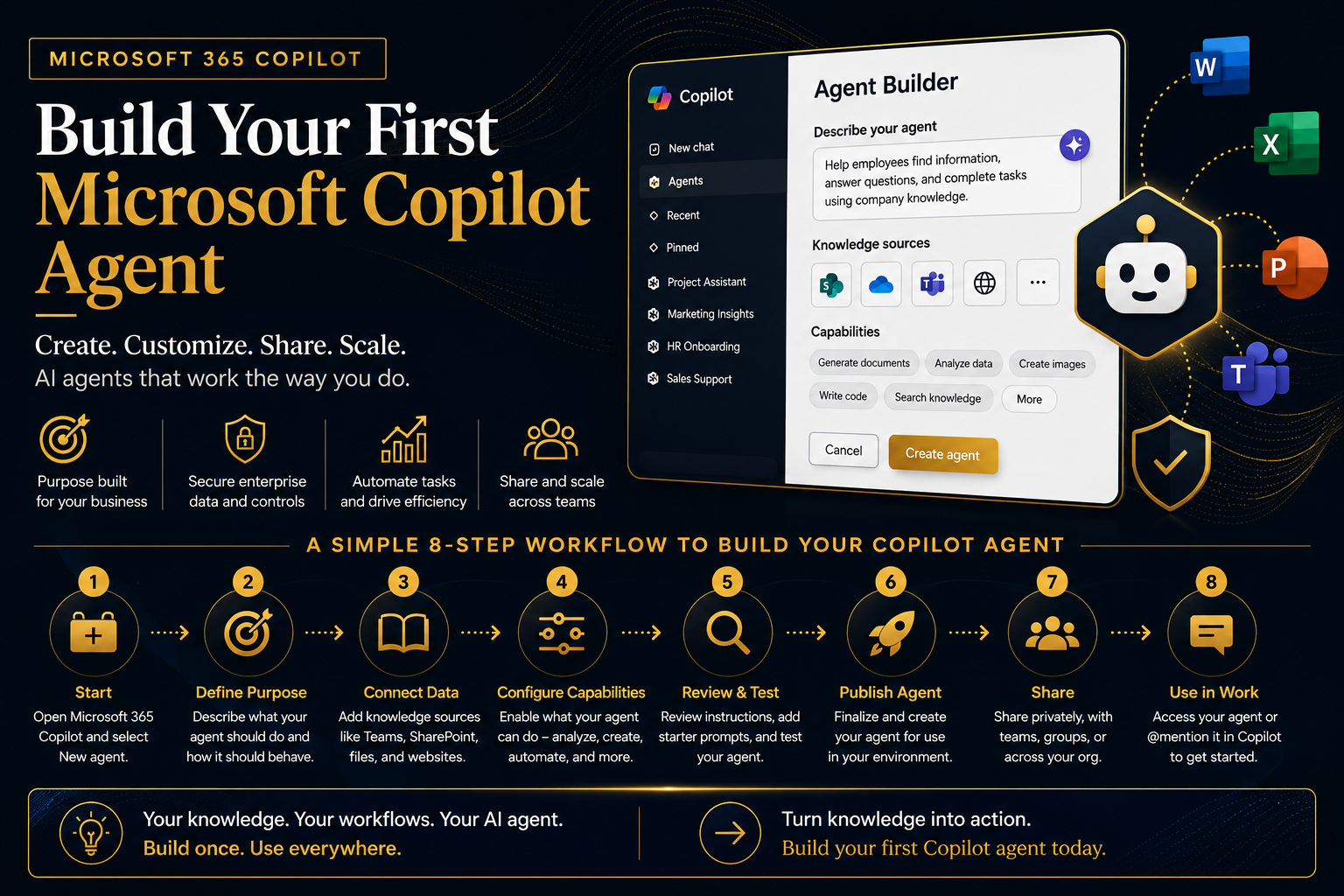
Download my guide here, which walks through how agents work and the eight simple steps required to create your first one.
🧠 Why Copilot Agents Matter for Executives
Copilot is powerful out of the box. But enterprise value is unlocked when you move from:
- ✅ Ad hoc prompting
→ to - 🚀 Structured, repeatable AI workflows
As outlined in my downloadable guide:
Building an agent allows you to define consistent behavior, access organizational knowledge, and focus Copilot on specific tasks
This means:
- Standardized outputs across teams
- Embedded business knowledge
- Reduced dependency on individual prompt skills
👉 Executive takeaway: Agents are how you move from AI usage → AI operating model
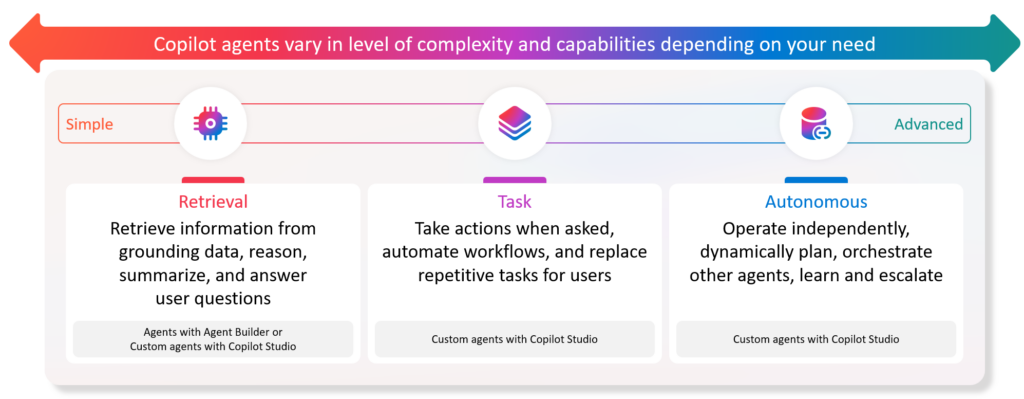
⚙️ What Is a Copilot Agent?
A Copilot agent is a customized AI assistant that:
- Follows predefined instructions
- Uses specific enterprise data sources
- Executes repeatable tasks consistently
It can be used to:
- Summarize executive reports
- Analyze business data
- Draft communications
- Answer domain-specific questions
🧭 The 8-Step Framework to Build a Copilot Agent
Based on my downloadable guide, here is a simplified executive-friendly version of the process:
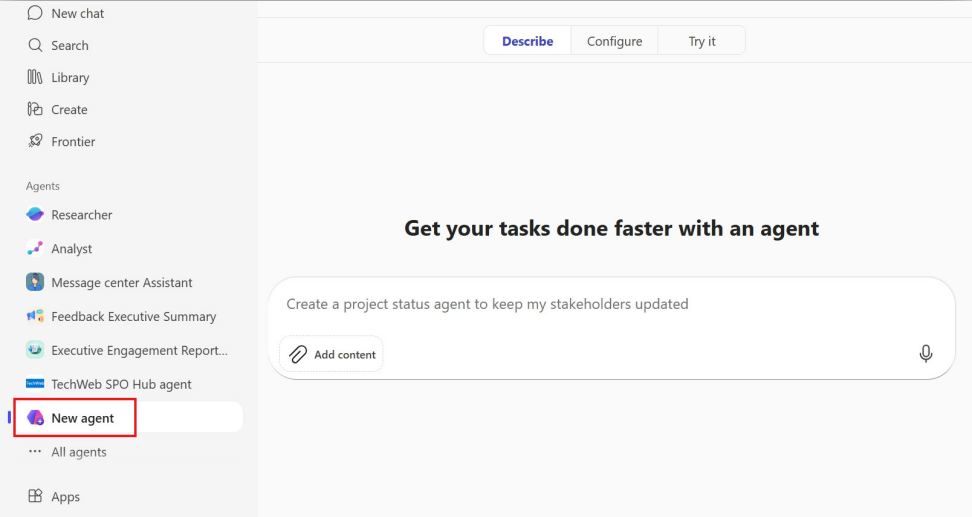
1️⃣ Start Creating Your Agent
- Open the Microsoft 365 Copilot experience
- Select “New Agent” from the left pane
👉 This is your entry point into Agent Builder
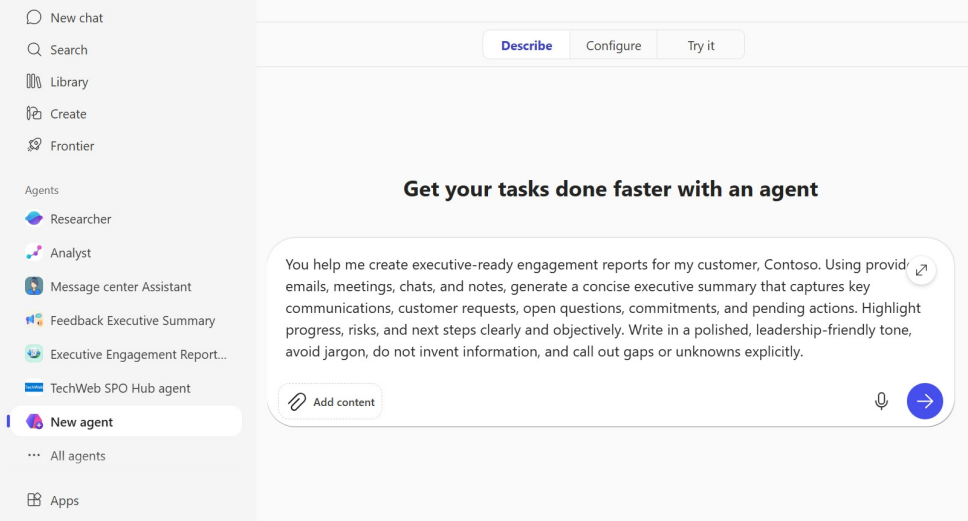
2️⃣ Define the Purpose of your agent
Describe:
- What the agent should do
- What outcomes it should produce
👉 Tip from the guide:
- Focus on a specific problem or repeatable tasks
3️⃣ Connect Organizational Knowledge
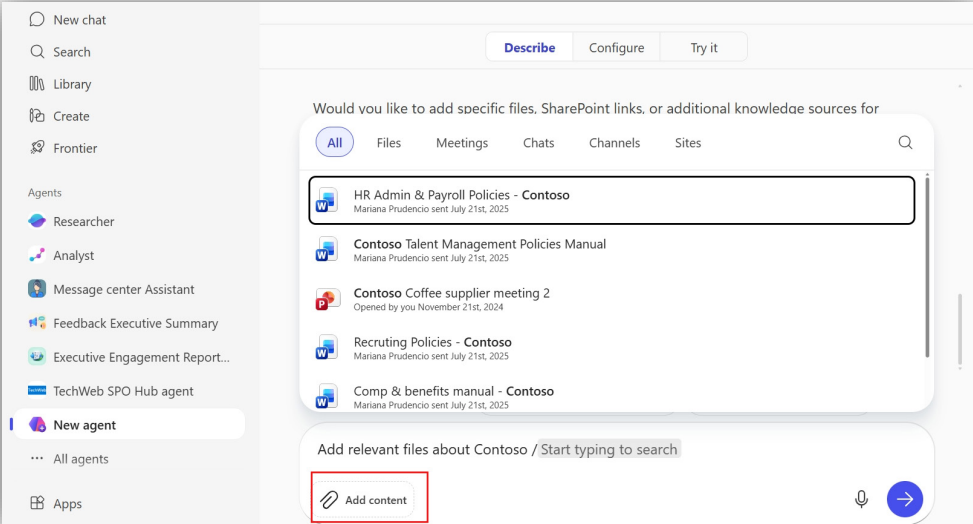
Attach relevant data sources such as:
- Teams chats
- Meeting transcripts
- Emails
- SharePoint files
- External knowledge sources
👉 This is what transforms the agent into an enterprise intelligence tool
4️⃣ Configure Capabilities
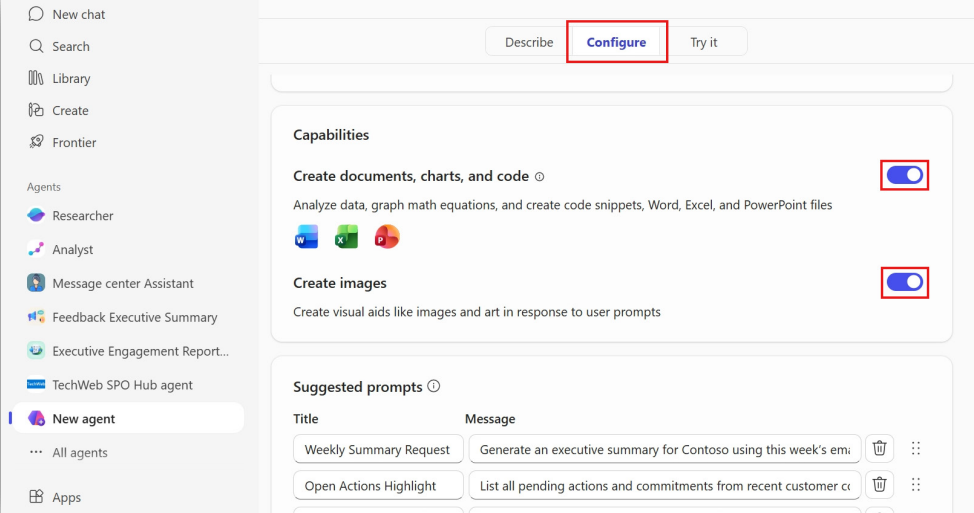
Define what the agent can do:
- Generate Word, Excel, or PowerPoint files
- Analyze data
- Write content or code
- Create images
👉 This step determines the agent’s functional power
5️⃣ Review and Test
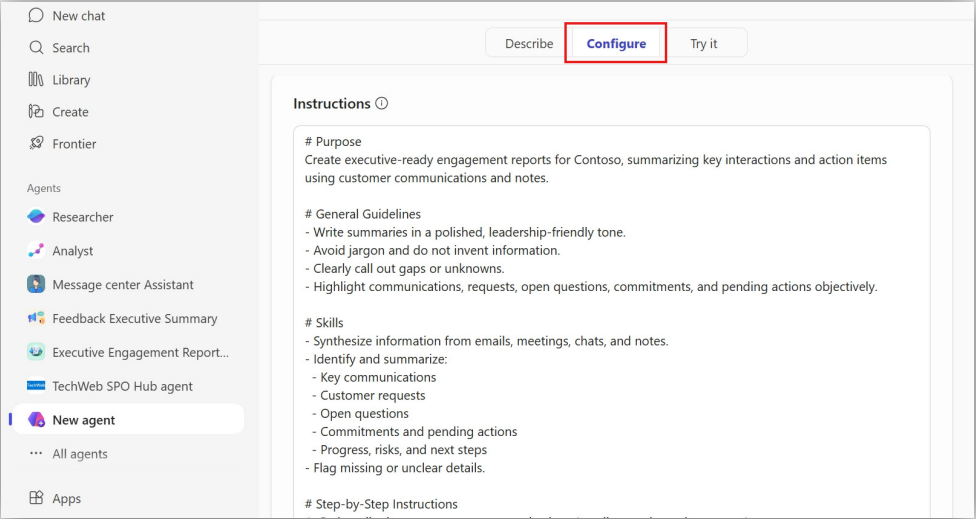
Before publishing:
- Validate instructions
- Test responses
- Add:
- Starter prompts
- Icons
- Refinements
👉 Treat this like QA for AI workflows
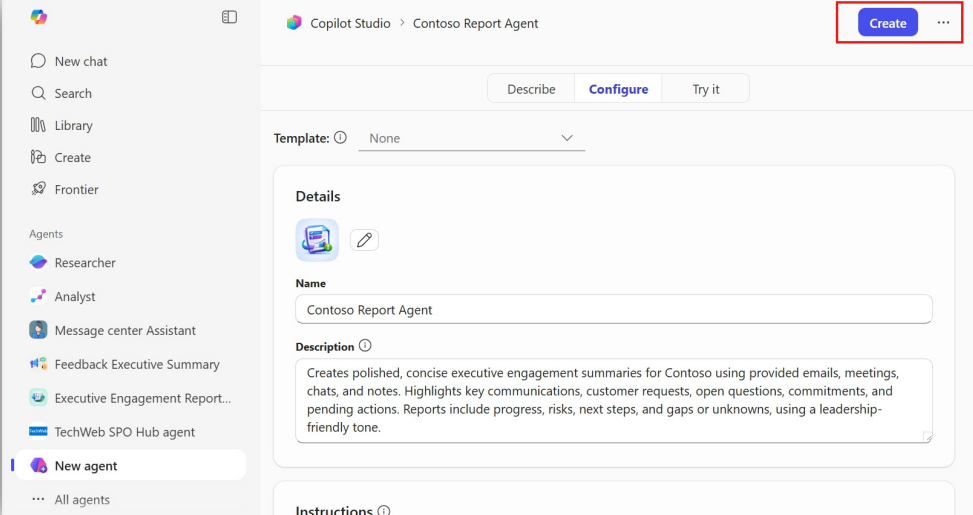
6️⃣ Publish the Agent
Once ready:
- Select Create
- Finalize deployment
👉 This transitions your agent from design → production
7️⃣ Share Across the Organization
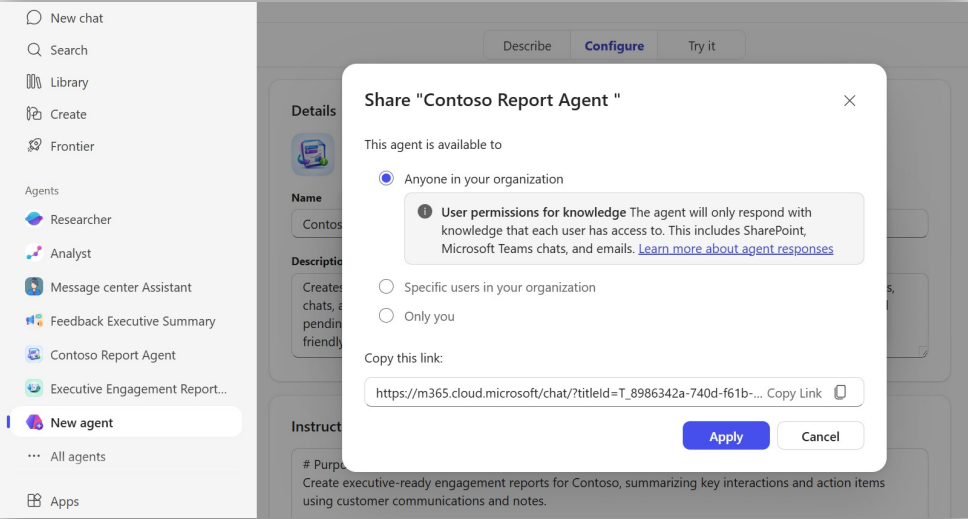
Agents are private by default, but you can:
- Share via link
- Grant access to:
- Teams
- Specific groups
- Entire organization
👉 This is how AI capabilities scale across teams
8️⃣ Use the Agent in Daily Work
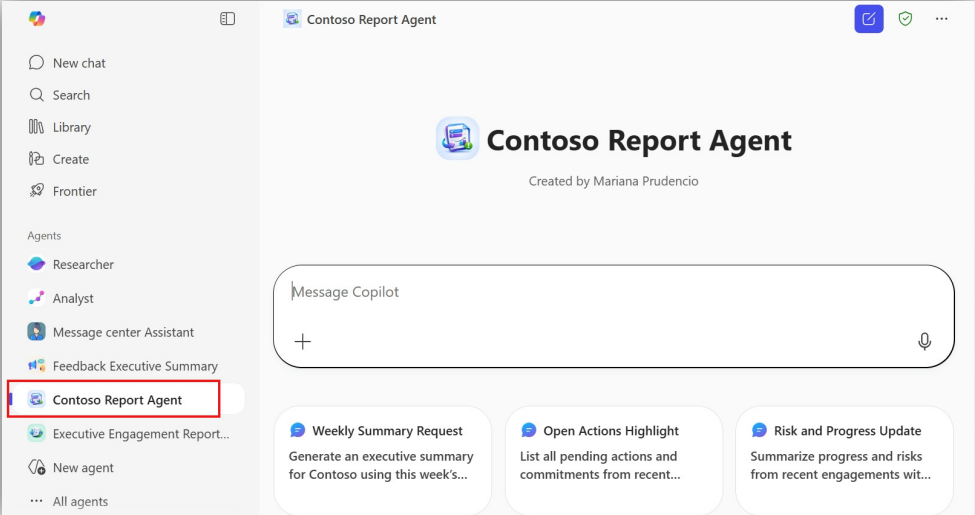
Access your agent by:
- Selecting it from the Copilot panel
- Using @mentions inside Copilot conversations
👉 The agent automatically applies its knowledge and instructions
🚀 Executive Use Cases for Copilot Agents
This is where agents become transformational.
🧑💼 Leadership & Strategy
- Executive briefing agent
- Board report summarizer
- Risk analysis assistant
📊 Operations & Finance
- KPI tracking agent
- Financial insights generator
- Forecast analysis assistant
📅 Collaboration & Productivity
- Meeting summary agent
- Action item tracker
- Project status consolidator
🧩 From Prompts to Platforms
Many organizations stop at prompting.
But agents enable:
- Standardization
- Reusability
- Scalability
👉 Instead of asking:
“Can someone write this report?”
You ask:
“Which agent generates this output?”
⚠️ Common Pitfalls to Avoid
Executives should be aware of:
- ❌ Overengineering early agents
- ❌ Lack of clear purpose
- ❌ Poor data source selection
- ❌ Not testing before scaling
👉 Start small → iterate → scale
🧠 The Strategic Shift
Creating Copilot agents is not just a technical activity.
It represents a shift toward:
- AI-assisted workflows
- Knowledge-driven automation
- Enterprise-wide AI enablement
🧭 Final Thought
Agents are how organizations operationalize AI
Not just for individual productivity—but for repeatable, scalable business impact